Every catering event, calculated and staffed in minutes.
Enter the guest count and menu and get exact prep quantities. Save your workers once, build the shift schedule, and hand every worker a clear PDF. Your online account manages the license, your devices and the secure download.
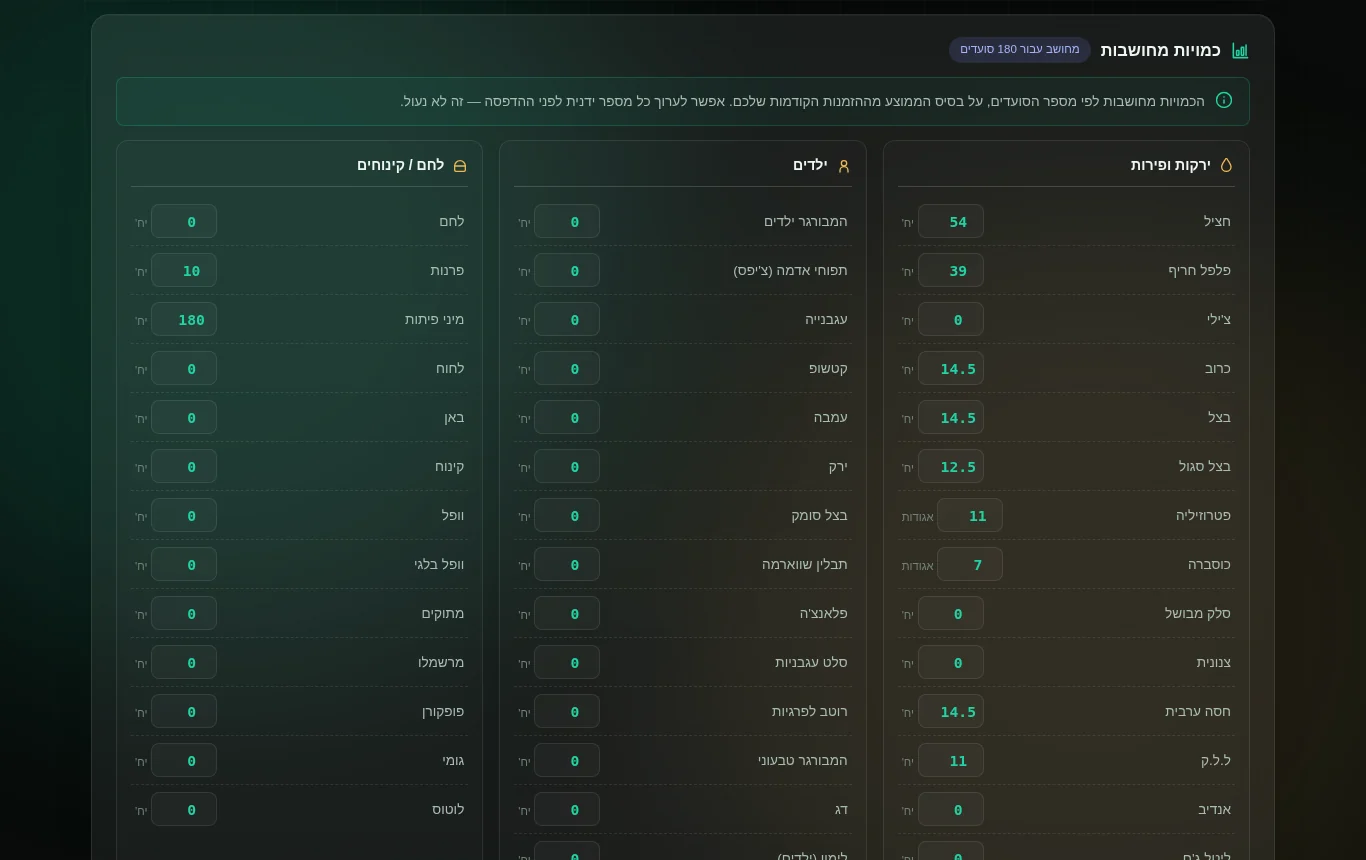
Actual product screen. The app interface is in Hebrew, built for Israeli catering operations.
Stop running events on guesswork and phone calls
Over-ordering wastes money. Under-ordering ruins the event. Scattered staff messages break the schedule. Catering Calculator replaces all of it with one deterministic plan.
The usual way
- Guessing how much to buy for the guest count
- Food and money wasted on over-ordering — or a shortfall mid-event
- Hours of manual prep math before every event
- Handwritten orders the kitchen can't read
- Staff scheduled through scattered calls and chat threads
One plan, from numbers to people
- Exact quantities calculated from guests and menu — editable before you print
- Kitchen work order and customer PDF in one click
- Your workers saved once — name, phone, role
- Shift schedules with a clear PDF for each worker
- Schedules shared to each worker's WhatsApp
From event planning to execution
Six steps, every one of them a real screen in the product you're buying.
Enter guests and menu — get exact quantities
Type the adult and kids count, pick the dishes, and the calculator produces per-item quantities across vegetables, kids' portions, bread and desserts. Numbers are based on your own configured rules and averages — and every figure stays editable before you print.
- Per-item kg / units for the exact guest count
- Editable quantities — nothing is locked
- Your own product list and quantity rules
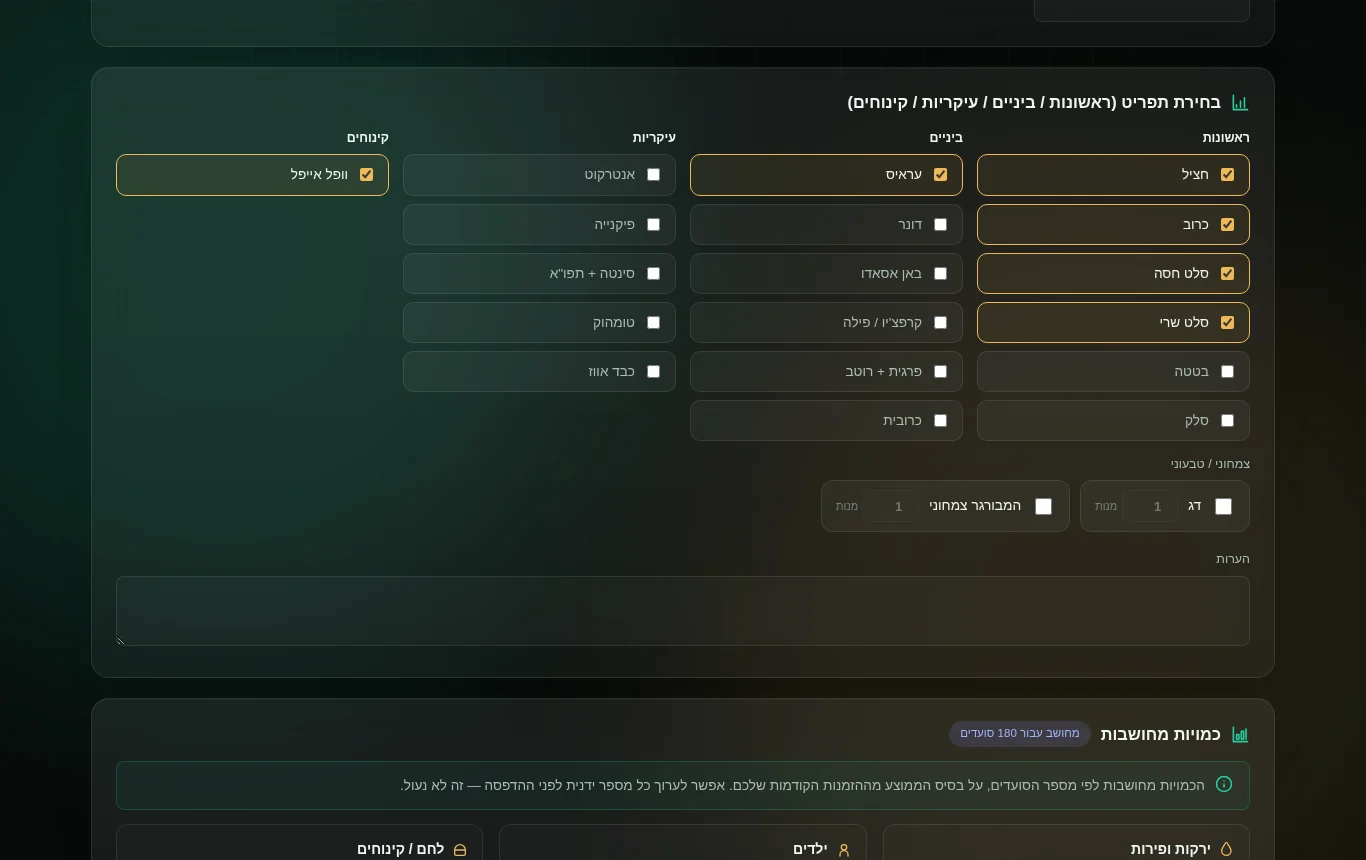
Set the event details and menu tier
Record the customer, date, venue and start time, price per head and advance, then choose the menu tier — from Tapas to Luxury — and tick starters, mains, sides and desserts. Dietary options are handled per dish.
- Customer and event record on the same screen
- Menu tiers with per-course selection
- Vegetarian / vegan portion counts
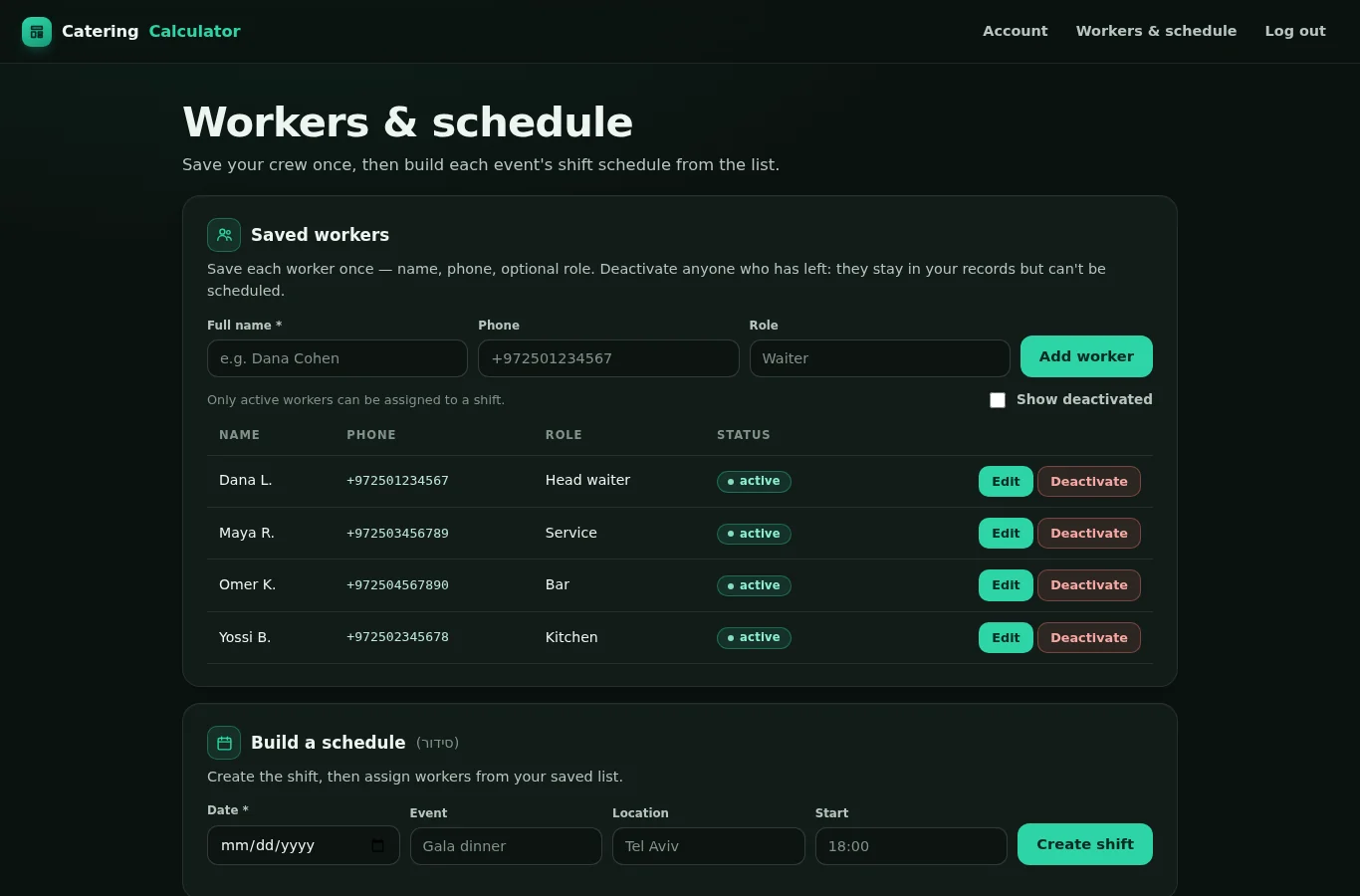
Save your workers once
Keep a directory of your crew — full name, phone and an optional role. Deactivate anyone who leaves; they stay in your records but can't be scheduled. Every worker belongs to your business only.
- Name · phone · role, saved once
- Active / inactive without losing history
- Private to your organization
Build the schedule
Create a shift with date, event, location and start time, then assign workers from your saved list — only active workers can be selected. Publish when it's final.
- Shift = date, event, location, start
- Assign from active workers only
- Draft, then publish

Generate the PDFs — kitchen, customer, worker
From the desktop app: a one-page kitchen work order and a branded customer PDF. From your account: a personal schedule PDF for each worker, ready to send to their WhatsApp number.
- Kitchen work order PDF
- Customer-facing PDF with your business name
- Per-worker schedule PDF + WhatsApp delivery

Manage the operation from your account
Your online account shows your plan, license and registered PCs, gives you the secure installer download, and is where the workers and schedules live. Everything is tied to your business — nothing is shared.
- Plan status and renewal date
- License and up to 3 registered devices
- Personal, expiring download link

One subscription. The whole job.
Every plan includes the full desktop app and the full online account. No tiers, no add-ons.
Exact quantities
Per-item amounts from guests and menu, using your own product rules. Editable before printing.
Menus & product settings
Menu tiers, per-course selection, and a configurable product list with quantity rules that persist across events.
Kitchen & customer PDFs
A clean one-page work order for the crew and a branded PDF for the customer, generated from the same event.
Worker directory
Save each worker once with name, phone and role. Deactivate leavers without losing records.
Shift scheduling
Create shifts, assign only active workers, publish when final. A personal schedule PDF for every worker.
WhatsApp delivery
With a worker's consent, send their schedule PDF to their WhatsApp number from the schedule page — once WhatsApp is connected on your server. PDFs are always downloadable.
Windows app — or in your browser
Install it on your PC and it opens in its own window, or open the same program straight from your account in the browser. Settings sync between them.
Account, license & devices
Your plan, license status and up to 3 registered PCs in one place — with a personal, expiring installer download link.
Hebrew interface
The desktop app is in Hebrew, designed right-to-left for Israeli catering operations. The website and account are in English.
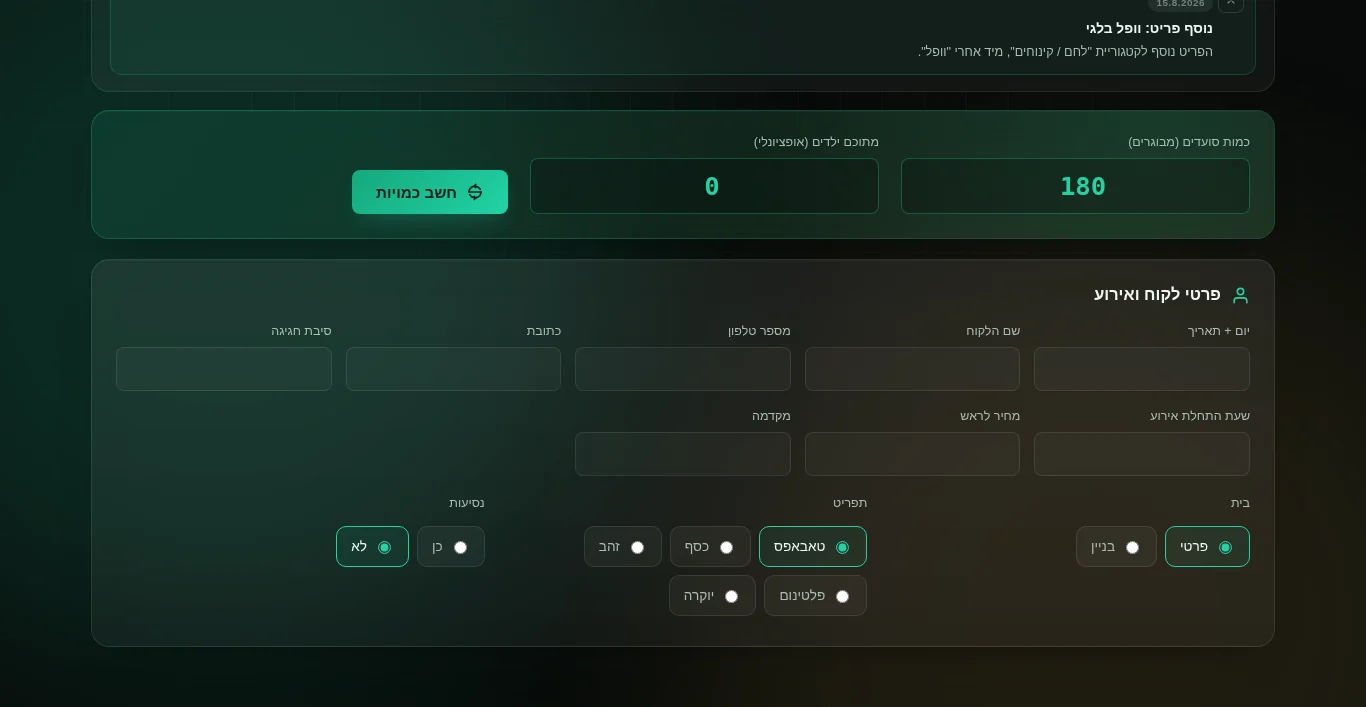
See what you're buying
Real screens from the current version — not mockups.
Payment, download and access — handled properly
Plain answers to the questions any business owner asks before paying.
Payments by Stripe
Checkout runs on Stripe. Your card details go to Stripe — never to us.
Personal download links
The installer is delivered through a private link tied to your account that expires after use.
You control the license
See your license status and the PCs registered to it. Remove a device from your account at any time.
Cancel anytime
Plans renew automatically and you can cancel at any time so you're not billed again.
Simple pricing. Everything included.
Both plans include the full desktop app and the full online account. Choose how you'd like to be billed.
- Full Windows desktop app
- Exact quantities, menus & PDFs
- Worker directory & shift schedules
- Per-worker PDFs & WhatsApp delivery
- Account, license & up to 3 devices
- Everything in Monthly
- Billed once a year — save 25%
- One invoice, no monthly admin
- Same full app and account
- Cancel anytime
Frequently asked
What exactly do I get?
The Catering Calculator program — run it in your browser from your account or install the Windows app — plus your license and registered devices, and the workers & schedule tools with per-worker PDFs (and WhatsApp delivery where connected).
What happens right after I pay?
The payment provider confirms the payment, your account shows the plan as active, and the program unlocks: open it in your browser right away, or download the installer for your PC and sign in inside the app.
Which computers can I use it on?
Windows PCs with the installed app, or any modern browser signed in to your account. One license covers up to 3 registered devices (a browser counts as one), and you can see and remove devices from your account at any time.
Is the app in Hebrew?
Yes. The desktop app interface is in Hebrew (right-to-left), built for Israeli catering operations. This website and your account are in English.
Does the app need an internet connection?
The app runs locally on your PC, so day-to-day work is fast and doesn't depend on your connection. Your account and license are checked in periodically; short offline periods are fine.
How does WhatsApp delivery work?
From the workers & schedule page you generate each worker's personal schedule PDF. If WhatsApp is connected on your server and the worker has agreed to receive messages, you can send it to their saved number with one confirmation; otherwise you download the PDF and share it yourself.
Can I cancel?
Yes. Plans renew automatically and you can cancel at any time so you're not billed again.
Run your next event with exact numbers and an organized crew.
Create your account, choose a plan, download the app. You'll be calculating your first event in minutes.